Minimum Cut Worktop

minCutWorktopRule
Minimum distance between the cut and the wall should not be less than the minCutValue defined value for the worktop.
Notification level: ℹ
| Key | Value |
|---|---|
| ID | minCutWorktopRule |
| Translation key | min_cut_rule_title min_cut_rule_error_message |
Behavior
This rule checks if the minimum distance between the cut of worktop and the skewed wall is less than the minimum cut value in order to prevent the user from creating unfeasible cuts on worktops.
Trigger Conditions
This rule is triggered when a minCutValue is defined either on the worktop parameters or via overloads. If the parameter exists, the system checks whether there is a cut on the worktop and evaluates the minimum distance between the cut and the skewed wall. If this distance is less than the defined minCutValue, the cut is considered unfeasible, and the application notifies the user through the Help Center that such cuts have been ignored.
Notes:
- When both the minCutValue parameter on the worktop and the one from the overloads are present, the value defined on the worktop takes precedence.
Overload Parameter
| Key name | Type | Default value | Description |
|---|---|---|---|
minDistance | Object | 55 | This parameter defines the minCutValue for different types of worktops which can be used for the minCutWorktopRule. |
For example:
[
    {
        "default":{
            "minDistance": 55
        }
        "conditionalValues":{
            "values":{
                "wood":{
                    "minDistance": 50
                }
                "laminate":{
                    "minDistance": 50
                }
                "stoneQuartz":{
                    "minDistance": 60
                }
                "thickVeneer":{
                    "minDistance": 75
                }
            }

        }
    }
]
Illustration
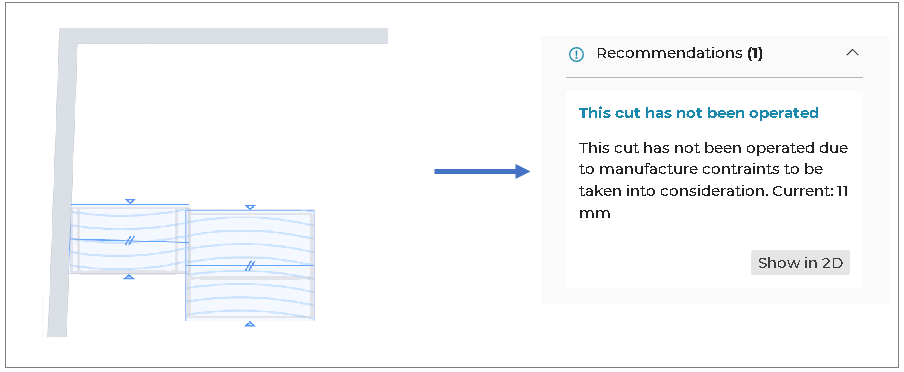
The worktop cut is touching the side of the skewed wall, the rule is triggered and informs the user that this cut has not been operated due to manufacture contraints to be taken into consideration.